Security incident reporting softwareSecurity incident reports, filed on the spot
Guards write the incident report on their phone the moment it happens and attach photos from the scene. Your office gets the email right away, and your client can read it in their portal that night.
- Free 7-day trial
- No credit card
- Set up the same day
Side door found open
Tue 22:58 · 800 Bay Street · Filed by Marcus R.
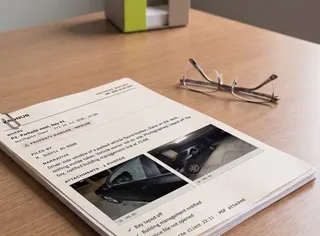
Side door on the ground floor found propped open with a wedge. Latch checked, door secured at 23:04 and maintenance told. Two photos attached.
- Emailed to your office · 22:59
- In the client portal for 800 Bay Street
What is security incident reporting software?
Incident reporting software replaces the paper incident form. Instead of writing up what happened at the end of the shift — or the next day — the guard files the report on their phone while they’re still standing there, with photos attached.
Every report is tied to the guard, the site and the time it was filed. Your office is notified straight away, and the report is ready to share with your client as a PDF.
What you get with Kronus
- Photos from the scene
- Guards attach up to five photos — or a PDF or Word file — straight from the phone, so the report shows exactly what they saw.
- Instant email to your office
- The moment a report is filed, your office gets an email, so a serious incident never waits until morning.
- Client portal
- Clients read the incident reports for their own sites in their portal, without calling you.
- PDF in one click
- Download any incident report as a clean PDF to send to a client, a property manager or your insurer.
- Guard, site and time
- Every report records who filed it, where and when — a record you can stand behind.
- Part of every patrol
- Incidents sit next to the night’s patrol scans and clock-ins, so you see the whole story of a shift in one place.
When a client asks, you answer in seconds.
Tap a question your clients really ask. The answer comes straight from the record — no digging, no guessing.
Was anyone checking the parkade at 3 a.m. last night?
Yes — here are the scans:
| 02:58 | Parkade P2 · Pillar A | NFC | |
| 03:04 | Parkade P2 · Pillar C | NFC | |
| 03:11 | Ramp to P3 | QR |
Why was the side door open on Tuesday?
Marcus found it at 22:58 and filed this on the spot:
Latch jammed. Door secured at 23:04, maintenance told. Photos attached.
How many hours did your guard actually work last week?
40.5 hours — every clock-in checked by GPS on site:
| Mon | 22:00 – 06:04 | 8.0 h |
| Tue | 21:58 – 06:00 | 8.0 h |
| Wed | 22:01 – 06:31 | 8.5 h |
| Thu | 22:00 – 06:02 | 8.0 h |
| Fri | 22:03 – 06:00 | 8.0 h |
Questions owners ask us
Something else? Email hello@kronus.space or ask on your demo.
Can guards add photos to incident reports?
Yes. Guards can attach up to five photos, PDFs or Word files to each report, straight from their phone.
Who gets notified when an incident is filed?
Your office gets an email as soon as the guard submits the report. It also appears on your dashboard and in the client portal for that site.
Can clients see incident reports?
Yes — only for their own sites. They can read each report and download it as a PDF.
Do I need a separate incident report app?
No. Incident reporting is built into the Kronus guard app on every plan, next to patrol scanning and clock-in.
Does it replace paper incident forms?
Yes. Guards file reports on their phone with photos, so there’s nothing to retype, scan or lose.
More of what Kronus does
Book a free 20‑minute demo
On a video call or by phone. We’ll show you what your guards, your office and your clients would each see, and answer every question.
- A live product tour, not a slide deck
- Pricing questions answered on the spot
- Start your free trial the same day
Prefer email? hello@kronus.space
Request received
Thanks! We’ll email you within one business day to pick a time.